Pixel art of a cat sitting in front of a wooden wall with plants and a yellow butterfly
184 × 184 px, 1:1

Erik Reitbauer, 17, software developer from Austria.

Last worked on habits, 8 Nov 2026.

I write software, mostly in Kotlin, and publish most of it as open source. Servers, tools, libraries, and the odd experiment.

Open to internships and developer jobs.

→ projects/ searchclick skip the drawing

Clay

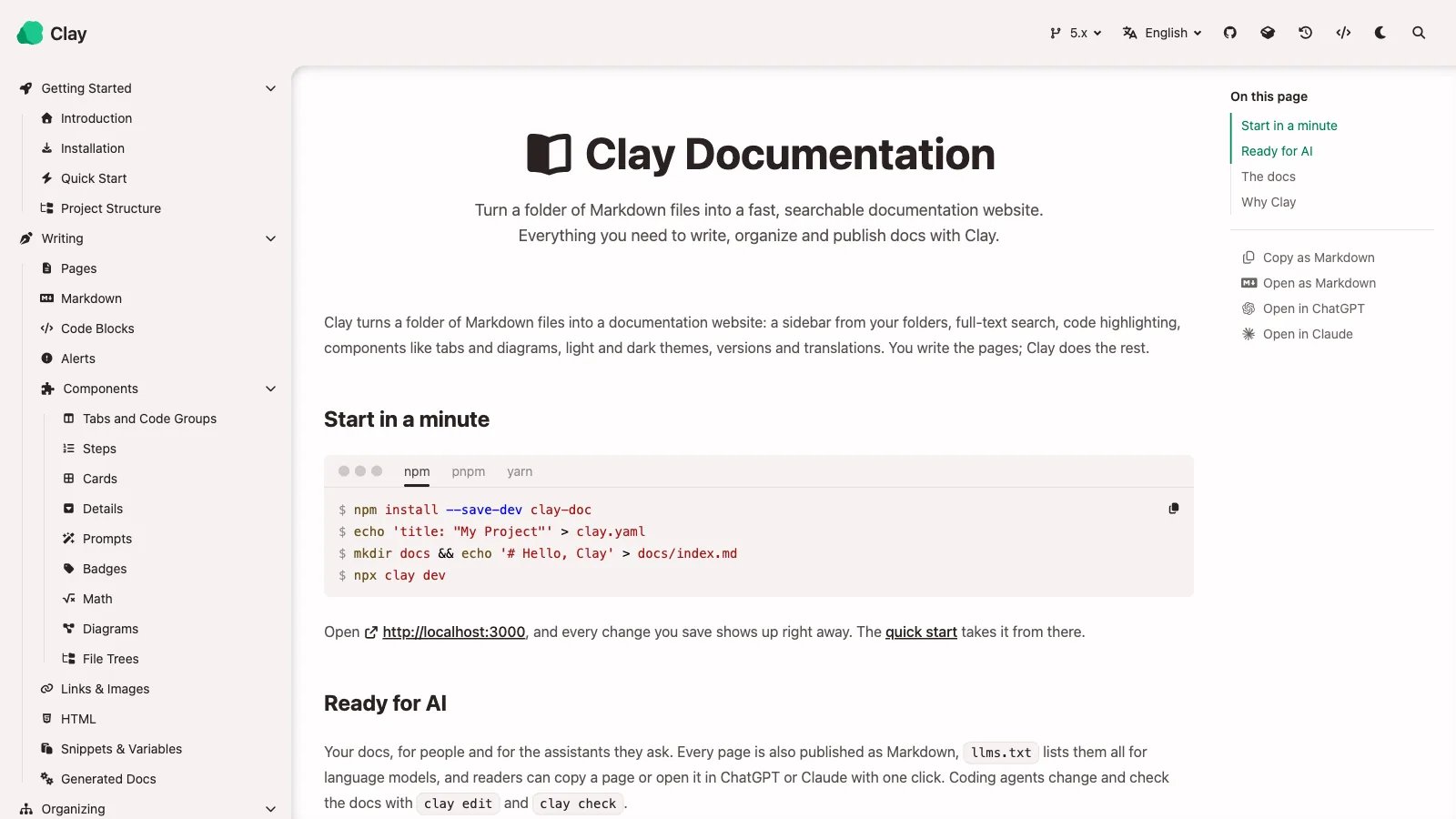
Turns a folder of Markdown into a fast, searchable docs site, ready for readers, search engines and AI agents.

Why it's here. A complete product I designed and maintain under its own organisation. Published on npm as clay-doc, now at version 5, and its own documentation is a Clay site.

Pages are plain Markdown in docs/, with tabs, steps, cards, diagrams, math and OpenAPI pages in the same syntax. clay dev previews every change live, and clay edit, clay check and clay search let people and coding agents rework the docs from the terminal. Versions, translations, themes and cookie-free analytics are set in clay.yaml.

2 repositories248 commits4 starsas of Nov 2026

  • Vue
  • Nuxt
  • TypeScript
  • Node.js
  • Tailwind CSS
  • Shiki

readme

Clay

The problem. Most documentation tools want a project to adopt a static site generator, a theme and a build of its own.

How it's solved. Clay is one npm package with a command line. A repository adds it as a dev dependency, writes Markdown in docs/ and a clay.yaml, and clay build pre-renders every page into a static site, with a search index, a sitemap, social images and a Markdown copy of every page for AI agents. The same build checks links and settings.

Clay turns a folder of Markdown files into a fast, searchable documentation site that readers, search engines and AI agents can all use. It is one npm package, clay-doc, built on Nuxt and Vue: a repository installs it, writes its pages in docs/, and clay build writes a static site that runs on any host, such as GitHub Pages. There is no theme to set up and no code to write.

Clay documents itself: the live demo is Clay's own documentation, built with Clay.

Capabilities

  • Pre-rendered pages that load fast, work without JavaScript and fit small screens.
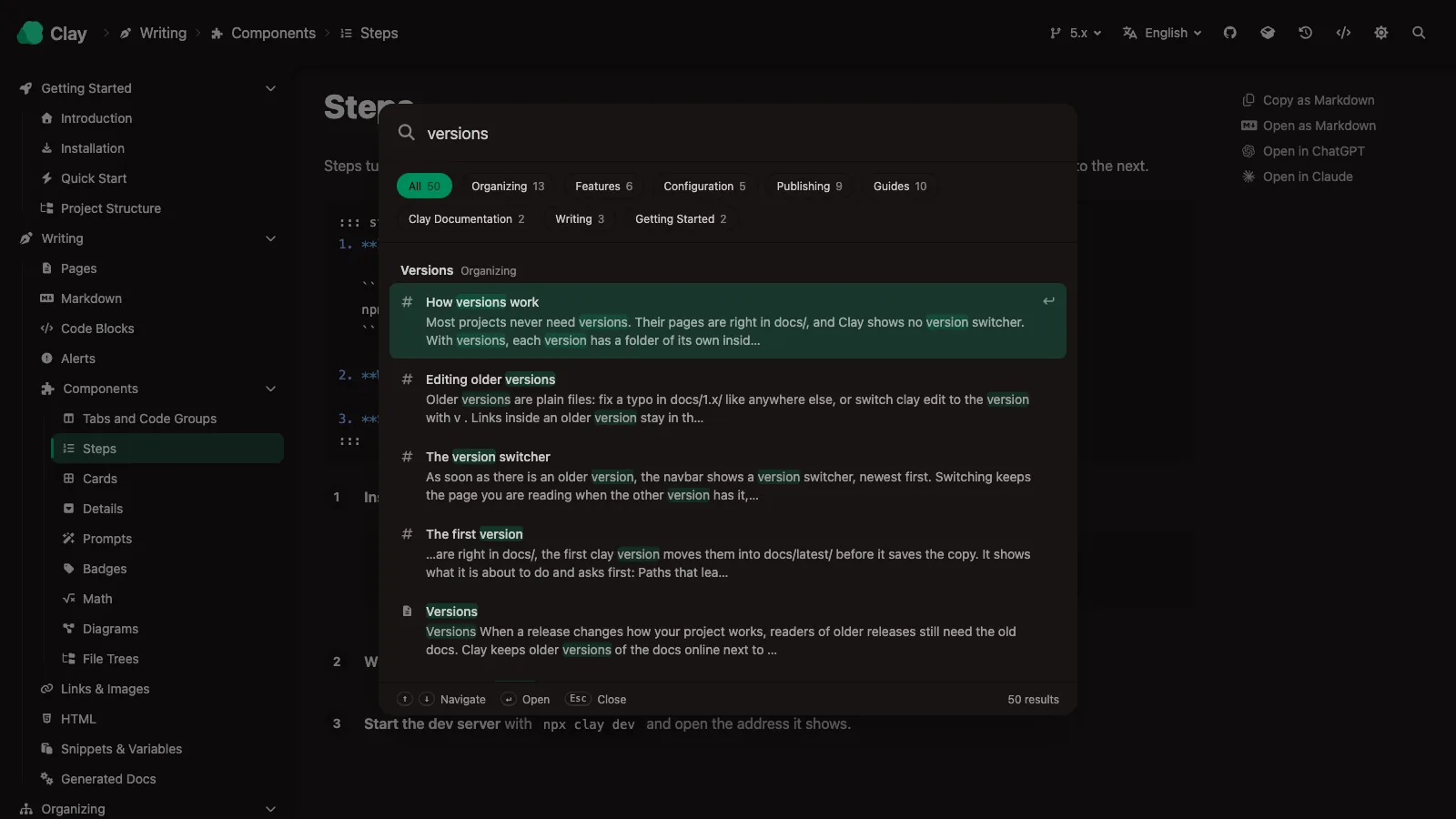
  • Full-text search across every page and section, grouped by page, typos forgiven.
  • Clay Flavored Markdown: tabs, steps, cards, details, badges, math, diagrams, file trees, prompts, videos and embeds, written in plain Markdown, plus snippets and variables to write a text once.
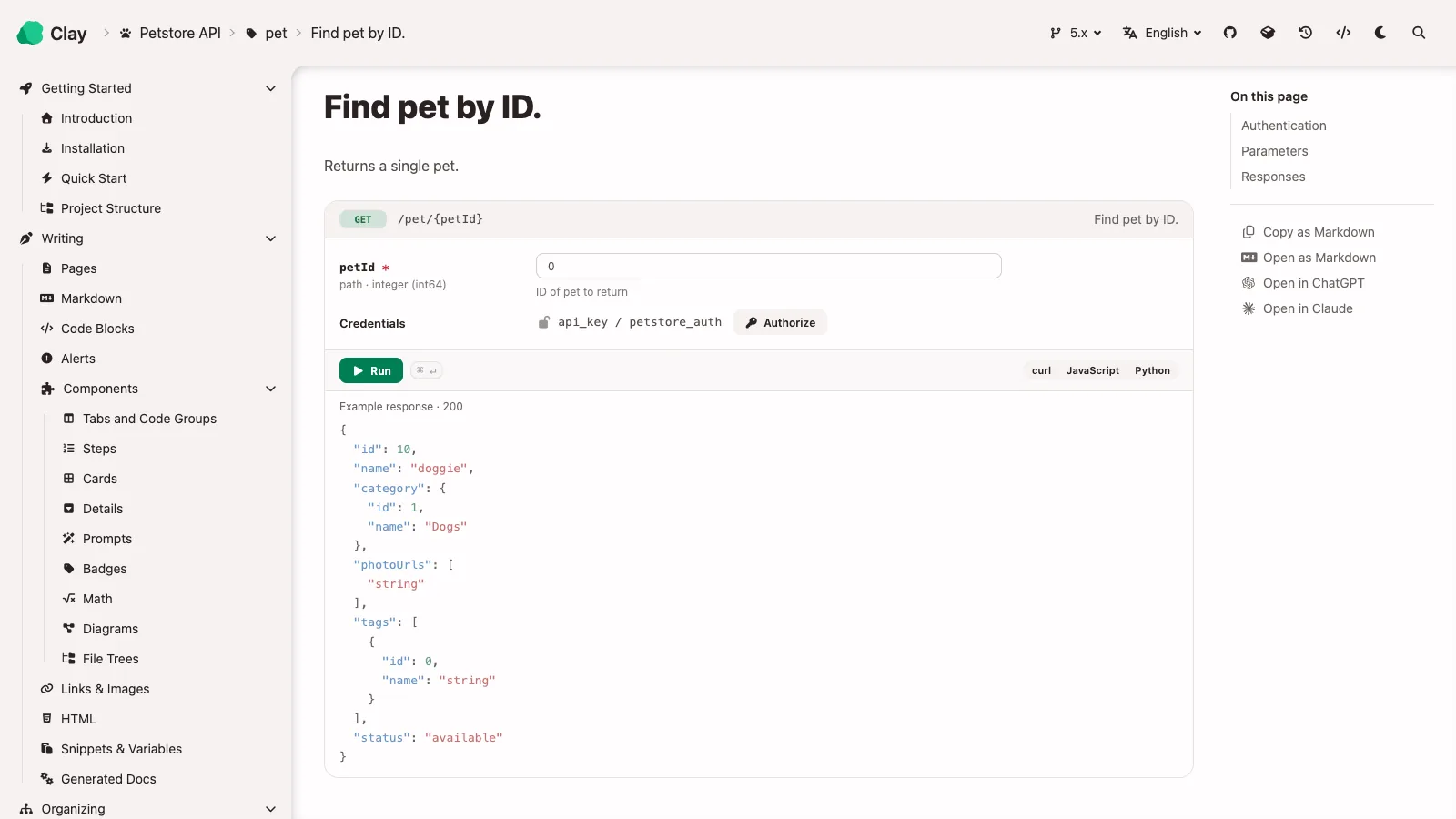
  • OpenAPI pages with request cells to try an endpoint right on the page.
  • Ready for AI: every page as Markdown, llms.txt, a page menu to open a page in ChatGPT or Claude, and commands coding agents understand.
  • Versions and translations, with switchers that keep the page you are reading, and redirects for pages that moved.
  • Your look: colors, corners and fonts in clay.yaml, light and dark themes.
  • Analytics without cookies through Plausible, Umami or GoatCounter, including searches that found nothing and a "Was this page helpful?" question.
  • SEO: canonical links, structured data, a sitemap and a social image for every page, in any script and with emoji.
  • Checks for broken links, missing sections and config typos; --strict turns them into build failures.

How It Works

Clay lives in the repository as a dev dependency. Everything it needs comes from two places: the Markdown in docs/ and one clay.yaml.

.
├── docs/                    # The pages (Markdown)
│   ├── index.md
│   ├── index.de.md          # The same page in German
│   ├── _snippets/           # Text to reuse, not pages of their own
│   └── guides/
│       └── setup.md
├── clay.yaml                # Configuration; only the title is required
└── package.json             # clay-doc as a dev dependency

At build time Clay loads the docs, checks every link and setting, turns the Markdown into sanitized HTML and pre-renders each page with its Nuxt app. The output in publish/public holds one HTML file per page, the search index, sitemap.xml, robots.txt, llms.txt and a Markdown copy of every page.

Commands

CommandPurpose
clay devLive preview while you write
clay buildBuild the static site
clay previewServe the build the way a web host would
clay editCreate, order, rename, move and translate pages, in a terminal editor or one command at a time
clay checkCheck links and settings without building
clay search <words>Find where a topic is written: file, line and section
clay version <name>Save the current docs as an older version

Configuration

Only title is required. A larger clay.yaml might look like this:

title: "My Project"
favicon: "logo.svg"
baseURL: "/my-project/"
siteURL: "https://my-org.github.io"
editURL: "https://github.com/my-org/my-project/edit/main/docs/"
version: "5.x"
languages: ["en", "de"]

navbar:
  logo: "logo.svg"
  source:
    name: "GitHub"
    icon: "fa-brands fa-github"
    link: "https://github.com/my-org/my-project"

analytics:
  goatcounter:
    code: "my-project"
  feedback: true

openapi:
  - spec: openapi/petstore.yaml
    title: "Petstore API"

Quick Start

In the repository that holds the docs (Node.js 22.22.3 or newer):

npm install --save-dev clay-doc
echo 'title: "My Project"' > clay.yaml
mkdir docs && echo '# Hello, Clay' > docs/index.md
npx clay dev

From Clay Oven to one package

Clay started as a prebuilt frontend that read the docs at runtime, filled in by Clay Oven, a separate Go CLI that scanned docs/ and bundled the site. Clay 2 replaced both with the clay-doc package, which pre-renders every page at build time, so the browser no longer renders Markdown. Clay 3 to 5 added index pages, versions in folders of their own, components, agent support, themes, analytics, OpenAPI pages and the rest of the command line.

Repositories

  • clay, the package: the Nuxt app and the clay command line.
  • clay-example-repo, Clay's documentation, built with Clay and using every feature.

Osmium

Runs a fleet of headless Minecraft agents that build one large schematic together.

Why it's here. My largest system so far. One operator uploads a schematic, Osmium splits it into segments, hands each agent its slice, and a web dashboard follows every agent live.

Agents sign in through a host process, walk or fly to their segment and place it course by course. The dashboard shows live 3D views, a shared map the agents chart as they move, inventories, telemetry and an audit log. Configuration is stored centrally and replayed to hosts on every reconnect.

357 commits346 of them mineAug 2026 first commitas of Nov 2026

  • TypeScript
  • Kotlin
  • Vue
  • Spring Boot
  • PostgreSQL
  • mineflayer

readme

Osmium

The problem. A dump of the database should never be enough to take over the Minecraft accounts the fleet plays with.

How it's solved. Osmium never holds the credentials and never performs the login. The backend only sends a host a setup command; the host signs the account in on a machine its owner controls and reports back the username and UUID. Hosts dial out to the backend instead of being connected to, and an unreachable host makes its agents' state unknown rather than offline.

Orchestration for a fleet of Minecraft agents that build a large schematic together. An operator uploads a schematic, picks the agents to work it, and Osmium splits it into segments and hands each agent its own slice. The dashboard shows what the fleet is doing: blocks left, throughput, the traffic every host moves, what needs attention, and what happened.

Agents can be sent anywhere by clicking the map or the 3D view. They walk there, or fly where the server allows it, and build what they are given one course at a time: stairs the right way round, slabs on the right half, doors hinged on the side they were drawn on.

Modules

ModuleWhat it isState
backend/Spring Boot 4.1 / Kotlin. Auth, accounts, hosts, agents, schematics, build plans and jobs, and the WebSocket hosts dial into.Built, 695 tests
frontend/Vue 3 / Vite SPA. Operator dashboard, the build pipeline, the live world viewer, the charted map and the storage breakdown.Built, 665 tests
host/Runs on a machine you control, holds the Minecraft credentials and the proxies, drives the agents. TypeScript, on mineflayer.Connects, plays, walks or flies where it is sent, reports its world, inventory and neighbours, streams what it sees, and builds the pieces it is given, 702 tests
testserver/A Paper server and the rig that builds on it: a schematic made of nothing but the block states that are hard to place, built for real and read back.Two scripts; see its README
host/ → osmium-linkThe host's own command line: the accounts it can log in with, and the proxies it can route through.Built

The one idea worth knowing

Osmium never holds Minecraft credentials, and never performs the login.

The backend sends a host a setup_agent command; that host logs the account in by whatever means it prefers and reports back only the resulting username and UUID. A full database dump therefore reveals which accounts you run, not the ability to run them.

That constraint shapes everything else: how agents are addressed, why hosts dial out instead of being connected to, and why a host being unreachable makes an agent's state unknown rather than offline.

FLEET_CONNECTIVITY.md is the design document, credential custody, the wire protocol, liveness, chat, and the alternatives that were rejected and why.

Running it locally

Needs JDK 25, Node 24 and Docker.

# 1. Postgres
docker compose -f backend/docker-compose.yml up -d

# 2. Backend on :8080
cd backend && ./gradlew bootRun          # gradlew.bat on Windows

# 3. Frontend on :5173, proxying /api to the backend
cd frontend && npm install && npm run dev

# 4. Optional: a mock host, once you have registered one and copied its token
cd backend && OSMIUM_HOST_TOKEN=osm_host_1_… ./gradlew mockHost

The mock host speaks the real protocol over the real socket, it connects, reports agents, telemetry and chat, fetches segments and places blocks, so the whole pipeline can be exercised without a Minecraft account. It is a development convenience, not a stand-in for the host program.

Sign in with admin / admin. Those are development defaults and are seeded only while the users table is empty, override OSMIUM_BOOTSTRAP_USERNAME / OSMIUM_BOOTSTRAP_PASSWORD, and OSMIUM_JWT_SECRET, before running this anywhere real.

Forkcast

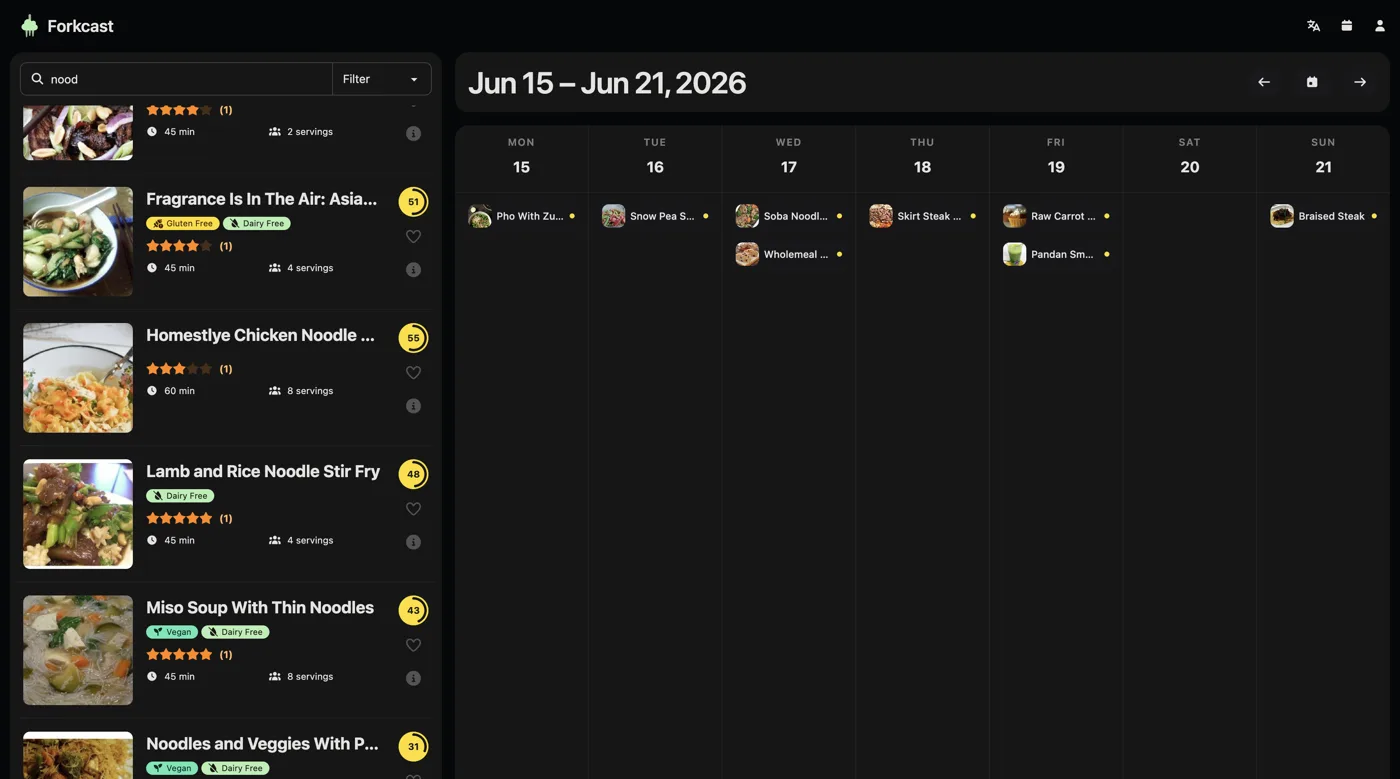
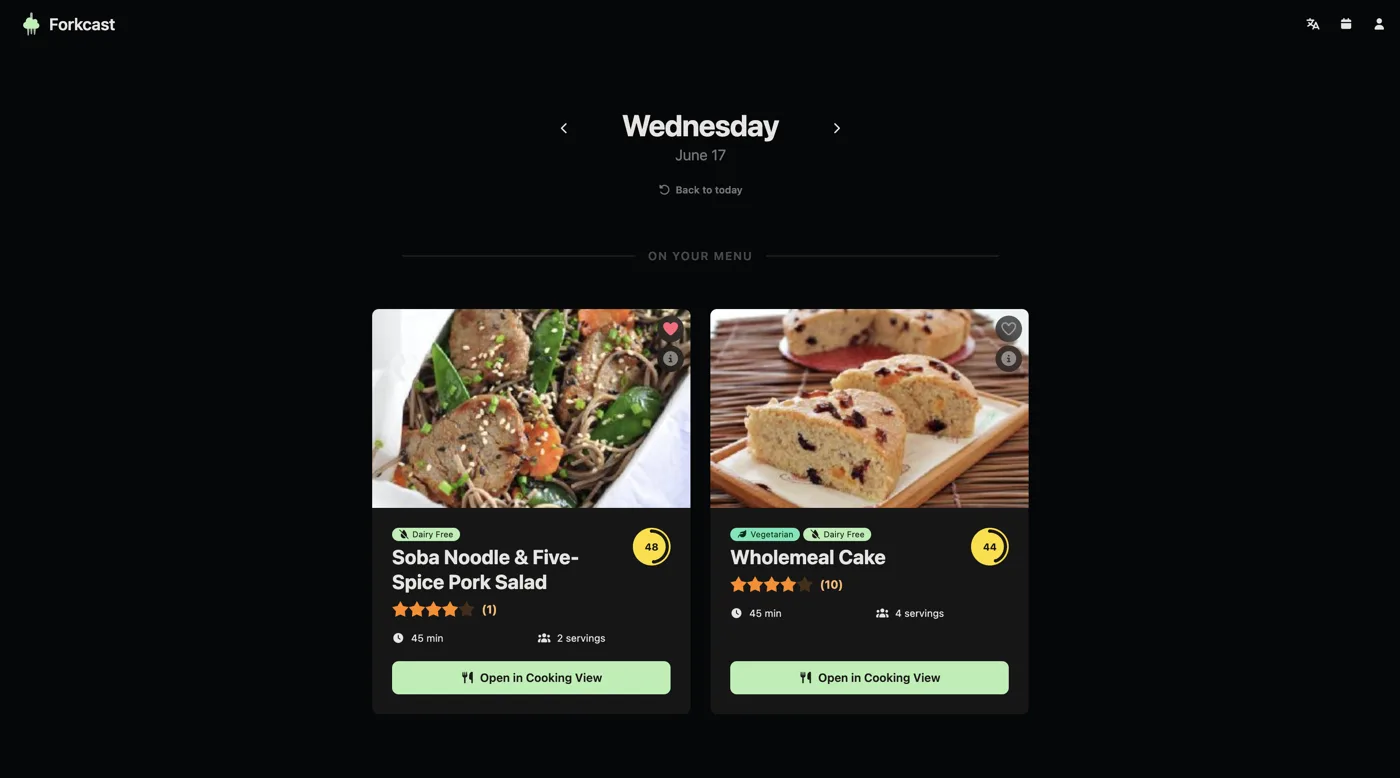
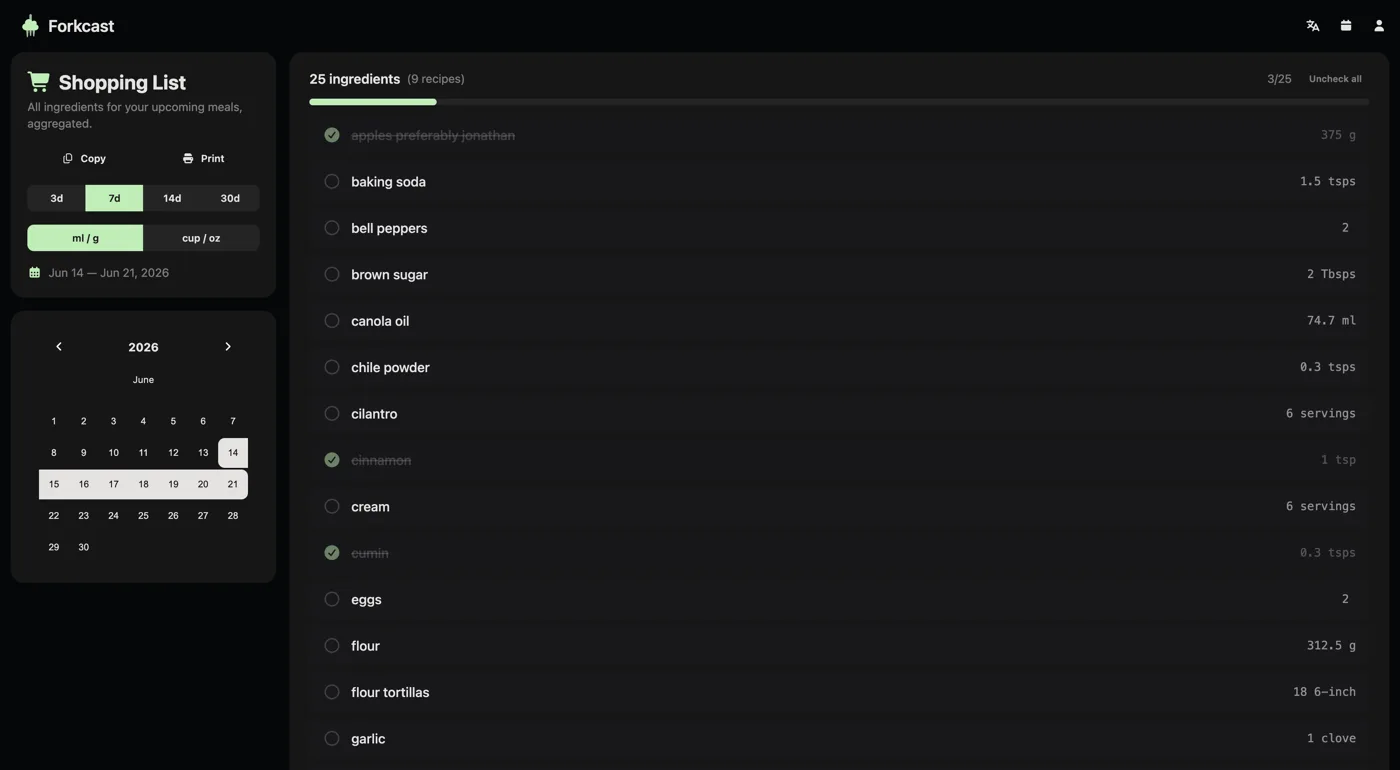
Meal planning with a drag and drop week and a shopping list that writes itself.

Why it's here. A team product with real interface work. Drag and drop planning, ingredient lists merged across recipes, friends, and nine languages including right to left.

Recipes come from the Spoonacular API. Portions scale ingredient amounts, identical ingredients are summed across the week, and anything already at home can be ticked off.

474 commits197 of them mine5 people9 languagesas of Nov 2026

  • Nuxt
  • Vue
  • Pinia
  • TypeScript
  • Express
  • SQLite

readme

Forkcast

The problem. A week of recipes lists the same ingredient many times over, in amounts for different numbers of people.

How it's solved. The shopping list is generated from the weekly plan: amounts are scaled to the portions of each meal, identical ingredients are merged and summed across the week, and anything already at home can be ticked off or reduced.

Forkcast is a web application that digitizes and simplifies meal planning. Instead of juggling paper lists, it combines a drag-and-drop weekly calendar with a smart shopping list, recipe discovery, and a small social layer around friends.

Features

Meal Planner & Calendar

  • Interactive weekly calendar as the core of the app.
  • Drag & drop recipes onto a weekday, categorized as breakfast, lunch, dinner, or a free-text label.
  • Portions scale ingredient amounts to the number of people.

Smart Shopping List

  • Generated automatically from the weekly plan.
  • Identical ingredients across recipes (e.g. onions) are merged and summed.
  • Stock check: tick off or reduce quantities for items already at home.

Discovery & Social

  • Home page acts as an inspiration feed with a daily highlight.
  • Friend network: add friends by username, send/accept/decline requests.
  • Privacy: each user chooses whether their weekly plan is public or private.

Recipes & Personalization

  • Spoonacular API as recipe source, with detailed ingredients and nutrition.
  • Search with filters, favorites, and per-recipe ratings.
  • Allergy / dietary filters applied to recommendations.
  • 9 UI languages including right-to-left (Arabic, Hebrew).

Architecture

Monorepo with two independently deployed apps:

PartStackDeploy
frontend/Nuxt 4 (Vue 3), Pinia, TailwindCSS 4 + DaisyUI, i18nStatic site → GitHub Pages
backend/Express 5, better-sqlite3, JWT, SpoonacularDocker image → GHCR

The frontend is a static SPA: it talks to the backend REST API at /api, holds the JWT in sessionStorage, and renders the dashboard client-side. The backend owns auth, the SQLite database, recipe caching from Spoonacular, and email (verification / password reset).

Quick Start

Run the backend and frontend in two terminals:

# Backend (REST API on :3000)
cd backend
cp example.env .env        # fill in JWT_SECRET, SPOONACULAR_API_KEY, ...
npm install && npm start

# Frontend (Nuxt dev server on :8080)
cd frontend
npm install
npm run dev -- --port 8080

Team

Kerimcan Yagci, Lukas Grünzweil, Erik Reitbauer and Nico Haider, as a summer project in school.

Backbone

A framework for Spigot servers with Kotlin scripts you can reload while the server runs.

Why it's here. Change server logic without a restart. Scripts get their own event bus, commands, inventory GUIs and storage, and reload in place.

118 commits6 stars169 downloadsas of Nov 2026

  • Kotlin
  • Kotlin Scripting
  • Coroutines
  • Spigot
  • SQLite

readme

Backbone

The problem. Every change to server logic meant restarting the Minecraft server.

How it's solved. Logic lives in Kotlin scripts that are compiled and reloaded in place with /bb scripting reload. Properties declared as sustained keep their value across reloads, so a script picks up where it left off.

Backbone is a powerful and flexible plugin for Spigot-based Minecraft servers. Its core idea: write, test, and update server logic on a live server without restarts, dramatically speeding up the development lifecycle.

Whether you are an admin adding custom features with simple scripts or a developer prototyping new ideas, Backbone gives you the tools to be more productive.

Features

  • Hot-Loadable Scripts: Write and reload Kotlin scripts without restarting the server.
  • Advanced Scripting: Inter-script imports, Maven dependencies, and custom compiler options.
  • Event System: A custom event bus that complements Bukkit's, with more control inside scripts.
  • Command Framework: A simple but powerful system to create commands directly from scripts.
  • Storage Abstraction: Flexible storage with SQLite databases and typed configuration files.
  • GUI Framework: A declarative framework for building interactive inventories.
  • Custom Items & Entities: Stateful items with abilities and custom entities via the goals API.
  • Display Entity Rendering: Create custom visuals in the world.
  • PlaceholderAPI Integration, HTTP Client DSL, memory-leak detection, and much more.

Getting Started

  1. Download the latest release and drop the .jar into your server's plugins directory.
  2. Start the server, Backbone generates its folders automatically.
  3. Write custom logic in .bb.kts script files inside scripts/.

Requires Minecraft Java 1.21.11+, a Spigot-based server (Spigot, Paper), and Java 17+.

Scripting Example

Every script uses the lifecycle DSL for hooks and event listeners:

lifecycle {
    // 'sustained' properties persist across script reloads.
    var counter by sustained(0)

    onLoad {
        println("Script loaded! Counter: $counter")
    }

    // Fires every server tick while the script is enabled.
    listener<TickEvent> { event ->
        counter++
        if (counter % 20 == 0) {
            Backbone.PLUGIN.server.onlinePlayers
                .forEach { it.sendMessage("Count: $counter") }
        }
    }
}

Scripts can pull Maven dependencies with @DependsOn, share code through .bbu.kts utility scripts, define commands, build GUIs, and talk to each other through inter-script messaging, all hot-reloadable with /bb scripting reload.

Helix

A quality of life mod for Fabric.

Why it's here. Shipped to real players and still downloaded.

Free and open source. Themes, accent colours and a set of small features that make the game nicer to play.

1,498 downloads16 followers25 commitsas of Nov 2026

  • Kotlin
  • Java
  • Fabric

readme

Helix

The problem. Server owners need a way to switch off modules they don't allow, without players changing their install.

How it's solved. The server sends a plugin message on the helix:config channel with a JSON list of module ids; Helix disables those modules until the player rejoins. Invalid JSON and unknown ids are ignored.

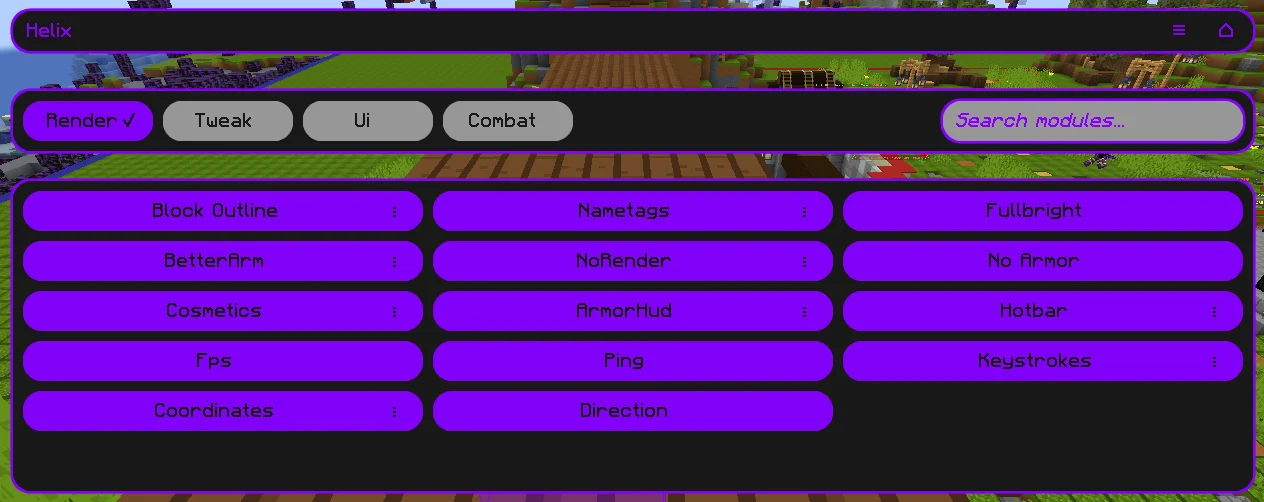
Helix is a QOL Mod that aims to improve your experience by adding various features. Helix is free and open source, forever.

Installation

Helix requires the Kotlin language adapter and the Fabric API to work correctly.

How to install, step by step

  • Download the latest release of Helix, the matching Fabric API and Kotlin language adapter
  • Put all 3 mods in your mods folder
  • Make sure you have the correct java version installed (17)
  • Make sure you have the fabric loader installed
  • Launch the fabric loader
  • Have fun!

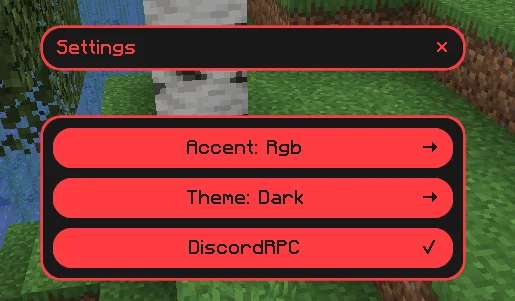
Accent colours

Rgb, orange, red, green, yellow, pink, purple and blue.

Themes

Dark and light.

In-Game features

  • Crystal Optimizer Optimized the placing and breaking of crystals clientside to improve crystal speed (removing broken crystals on the client...)
  • Block Outline Changes your block outline and adds optional entity outlines
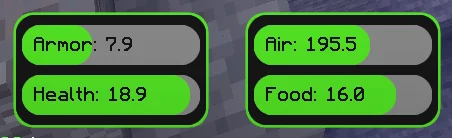
  • Armor Hud Shows you your armor on the screen without having to open your inventory
  • Autosprint Presses the sprint key for you
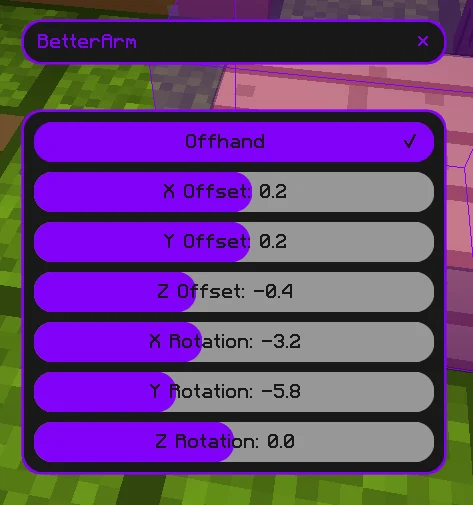
  • Better Arm Changes the rendering of your In-Game hand
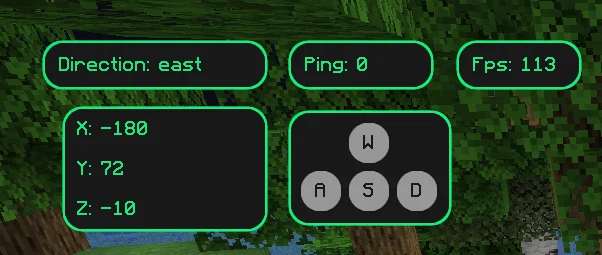
  • Coordinates Shows you your coordinates in the world
  • Cosmetics Render cosmetics clientside, for free
  • Directions Shows in what direction you are facing
  • Fps Display Shows your current Fps
  • Fullbright See in the dark
  • Hotbar Changes several status bars to literal bars
  • Keystrokes Shows what keys are being pressed
  • Nametags See your own nametag and add information to it
  • No Armor Hides your armor clientside
  • No Render Disables the rendering of certain things
  • Ping Display Shows your current ping
  • Chat Format Create gradients without leaving Minecraft. Can also solve simple math, for example <solve>1+2*(27-5)/5<solve>

Commands

  • /helix Opens the main UI
  • /gmc player Puts you or the optionally specified player in creative mode (only works if you have permission on the server since we are just redirecting commands)
  • /gms player Puts you or the optionally specified player in survival mode (only works if you have permission on the server since we are just redirecting commands)
  • /gma player Puts you or the optionally specified player in adventure mode (only works if you have permission on the server since we are just redirecting commands)
  • /gmsp player Puts you or the optionally specified player in spectator mode (only works if you have permission on the server since we are just redirecting commands)

Discord Presence

Shows some information about the server or world you are on to your friends on discord

For Developers and Server Owners

The following example code can be used to block modules from being used on your server. In the future, there may be more options for configuring the mod via the server.

Json Structure for the payload

This is the structure to use in the payload of the message sent to the player. Invalid json and incorrect module ids will be ignored. You can find the module ids in the respective modules. The ids can always be found in the header of the module and will always be in the following scheme: moduleName.

{
  "disabled": [
    "armorHud",
    "autoSprint"
  ]
}

Sending the configuration json in your plugin

This code can be put for example in the onJoin listener. Once disabled, modules stay disabled until the player rejoins the server. Then they need to be disabled again.

<player>.sendPluginMessage(<plugin-instance>, "helix:config",
     <json-payload>.toByteArray()
);

More

Libraries and older experiments.

Aether

Socket transport with a binary codec, kotlinx.serialization and coroutines.

  • Kotlin
  • Coroutines
  • kotlinx.serialization

konvert

A small JSON parsing library.

  • Kotlin

Content Automation

Generates short videos with text to speech and automatic subtitles.

  • Kotlin
  • Python
  • ffmpeg
  • Whisper

Posts

RSS
  1. Changing a Minecraft server without restarting it

    Backbone lets server logic live in Kotlin scripts that reload while the server keeps running. How the lifecycle DSL keeps state across reloads.

    backbone, kotlin, minecraft

    read

  2. Why Osmium never holds a Minecraft login

    Osmium runs a fleet of Minecraft agents, but its backend never sees their credentials. That one rule shaped the protocol, the liveness model and how hosts connect.

    osmium, architecture, security

    read

/ backbone, kotlin, minecraft

Changing a Minecraft server without restarting it

Developing plugins for a Spigot server usually means the same loop: change code, build a jar, restart the server, rejoin, test. Backbone removes the restart. Server logic lives in Kotlin scripts (.bb.kts) that are compiled and reloaded while the server keeps running.

One lifecycle per script

Every script declares what happens when it loads and which events it listens to:

lifecycle {
    // 'sustained' properties persist across script reloads
    var counter by sustained(0)

    onLoad {
        println("Script loaded. Counter: $counter")
    }

    listener<TickEvent> {
        counter++
    }
}

/bb scripting reload swaps in the new version of every script without touching the rest of the server.

Keeping state across reloads

Reloading would be much less useful if every counter, cache or cooldown reset each time. Properties declared with sustained(...) keep their value when the script is reloaded, so you can change behaviour while the state stays where it was.

More than single files

  • Scripts can pull Maven dependencies with @DependsOn.
  • Shared code goes into utility scripts (.bbu.kts) that other scripts import.
  • Scripts define commands, build inventory GUIs and talk to each other through inter-script messaging, and all of it is hot-reloadable.
  • Around that sit a custom event bus, SQLite backed storage, typed config files, custom items and entities.

Backbone is on Modrinth and runs on Spigot based servers (Spigot, Paper) for Minecraft 1.21.11 and Java 17 or newer.

/ osmium, architecture, security

Why Osmium never holds a Minecraft login

Osmium coordinates a fleet of headless Minecraft agents that build one large schematic together. The obvious design would store each account's login in the backend and let the server start agents on demand. I went the other way, and it ended up shaping most of the system.

The rule

Osmium never holds Minecraft credentials, and never performs the login.

When an agent should come online, the backend sends its host a setup_agent command. The host logs the account in by whatever means it prefers and reports back only the resulting username and UUID. The credentials stay on the machine that runs the host.

What it buys

A full dump of the Osmium database reveals which accounts you run, but not the ability to run them. The backend simply has nothing that could log an account in.

What it costs, and what followed from it

  • Hosts dial out. The backend cannot start anything by itself, so hosts connect to it over a WebSocket and wait for commands, instead of the backend connecting to them.
  • Unknown is not offline. If a host stops answering, the backend has no way of checking the account itself. An agent on an unreachable host is shown as unknown, not offline, because that is all the backend actually knows.
  • Agents are addressed through their host. The host that holds an agent is also where its proxies and their credentials live. An operator can route an agent through a proxy by name, and the secret never leaves that machine.

The same idea keeps coming back while building features: if the backend would need a secret to do something, the host does it instead and reports what happened.

The full design lives in the Osmium repository.

Timeline

  1. Started with Java

    Object-oriented basics, small projects, first libraries.

  2. Switched to Kotlin

    Has been my main language since.

  3. Spring and Vue

    Backends in Spring, frontends in Vue. First published mod, Helix.

  4. Internship, Cloudflight Austria GmbH

    Mobile app for employees, built with Kotlin Multiplatform.

  5. Backbone, Clay, Granum, Osmium

    Server framework, docs toolchain, Claude Code memory, agent orchestration.

  6. Internship, Cloudflight Austria GmbH

    Android app for last mile management, Kotlin and Jetpack Compose.

  7. Next up

    Whatever turns out to be interesting.

Skills

click a skill to see moretap a skill to see more

Languages

Databases

Frameworks

Tools & DevOps

Testing

Contact

Email is the fastest way to reach me,

CV available on request.

Done.

Last updated 13 Nov 2026.